MFlenses - 数码时代的新生
MFLenses 2026

手动对焦镜头论坛

通过维修记录、实拍样片和图文丰富的档案帖,探索老镜头的世界。

通过维修记录、实拍样片和图文丰富的档案帖,探索老镜头的世界。
精选

论坛首页的合作伙伴展示位。

Soft proofing in Lightroom
查看上一个主题 :: 查看下一个主题  


Reply

Hi Folks,

Does anyone here use this kind of workflow?

http://www.lightroom-plugins.com/ProofIndex.php


Thanks


Reply

I learned how to use soft proofing in Photoshop from the Luminous-Landscape 'From Camera to Print' video. It looks pretty good when it is explained, but I've found it to be somewhat limted in its real world utility. I prefer to print a 1/4 sheet center-image proof and use that for my baseline color/contrast testing.


Reply

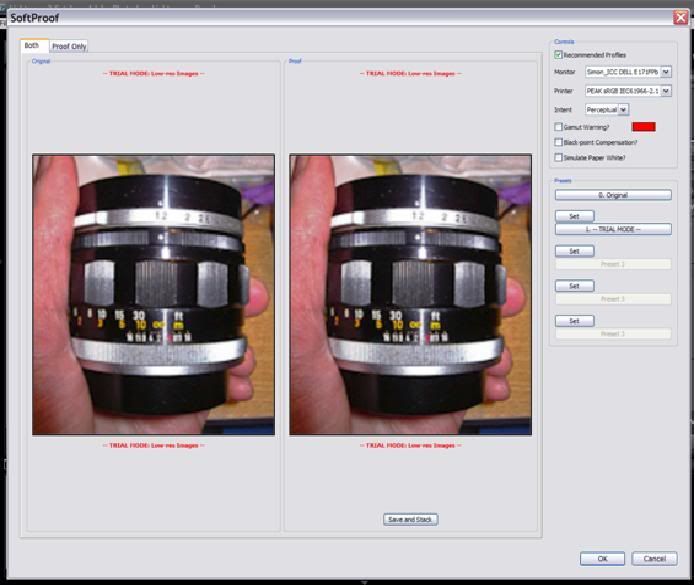
Seems to work, but I am unsure if it is true to life or accurate:

My monitor:
DELL E171FPb - custom calibration using Huey Pro.

Printer profile:
Peak Imaging, UK:
http://www.peak-imaging.com/downloads/PEAK%20sRGB%20IEC61966-2.1.icm

You are looking at an exported image from LR using PEAK sRGB IEC61966-2.1 colour space.

LHS = my monitor output
RHS = proof for print outout


It seems to show that my monitor is pretty accurate (but not perfect).


Reply

I don't see lot of differences
seem logical if your lcd is calibrated sRgb and the printer's icm is also sRgb


Reply

stingOM 写道:

It seems to show that my monitor is pretty accurate (but not perfect).


Not really - soft proofing does not work that way, any monitor inaccuracy will show up evenly on both sides. What it shows is that your printer has a profile (though only a test print can tell whether it is the proper profile) which does not have a smaller (or otherwise mismatched) colour space than the monitor - soft proofing will warn you of differences in colour space and their consequences.